It Doesn't Matter Which Tool You Start In
A bidirectional bridge between code and Figma — token sync, component generation, drift detection, and a handmade communication protocol between two tools that were never designed to talk to each other.
I Left Figma Behind
I'd spent weeks building a design system in code and a conversational builder without opening Figma once. I'd found a great cadence: build, catalog, dogfood, repeat. Then I realised: this isn't how people actually work.
A design system that only exists in Xcode is great for indie development. It's useless for collaboration. Designers need a canvas. If I wanted anyone else to use this system, it had to exist in Figma too. The same tokens, the same components, the same structure. Not a rough approximation. An exact representation.
The question was how. Most design system tools go Figma to code. This one needed to go the other way.

You Can't Build Components Without Tokens
Before I could create a single component in Figma, every token needed to be there first. Colours, spacing, radius, semantic references. The entire foundation that components are built on top of. Without it, you're just drawing rectangles with magic numbers.
Doing this manually would have taken days. Radix alone is 22 hues × 12 steps × light and dark modes, and I had a custom setup (alphas up to a certain step, opaques after that). Setting up the semantic aliasing chain on top of that, by hand, in Figma's variables manager? I would have driven myself crazy.
My first instinct was Figma's REST API. Write access is paywalled to enterprise plans. So I built my own Figma plugin from scratch — a TypeScript codebase that runs inside Figma and has direct access to everything: variables, collections, aliasing, component creation, documentation. The Plugin API turned out to be more powerful than the REST API anyway, since it can create variable bindings and component properties that the REST API can't.
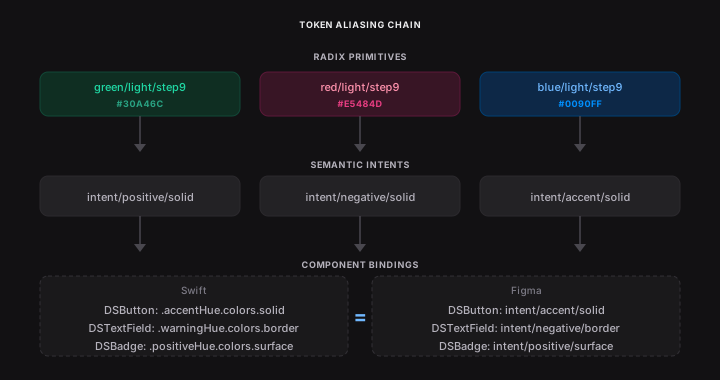
A single command pulls 600+ tokens into Figma's variables manager in three seconds. Perfectly named, perfectly organised, split into collections. The aliasing architecture is 3–4 levels deep — Radix primitives alias into semantic intents, which bind to component properties. intent/positive/solid aliases to colors/green/light/step9, which holds the RGBA. Change a primitive, it cascades through every reference. Exactly how the Swift token system works, mirrored in Figma, maintained by the plugin.

With the foundation in place, the real question became: can you build an entire component from code?
A Component in Seconds
This is where the plugin gets serious. With tokens in place, it can generate entire Figma components — programmatically. Not a flat rectangle with some text on it. A structurally correct component set with auto-layout nesting, variant states, boolean properties for show/hide, text overrides, and every single value bound to the tokens it just pushed.
The plugin reads the same spec the SwiftUI code uses and builds the Figma equivalent from scratch: frames nested inside frames with correct sizing modes, text layers with style bindings, fills and strokes referencing semantic tokens, padding and spacing values wired to the spacing scale. The corner radius isn't a magic number — it's bound to radius/semantic/textField. The padding isn't hardcoded — it's bound to space/20. Every value references a variable, not a hex code. The structure mirrors how the component is built in code: same naming conventions, same hierarchy, same intent.
This is ~870 lines of TypeScript I wrote to do what would take a designer hours of manual Figma work. One command, one second, and the output is indistinguishable from a hand-built component — except every value is traceable back to code. No design tool does this. Token sync tools exist. Component generation from code, with full variable bindings and variant state mapping, at this fidelity? I couldn't find one, so I built it.
Look at what the plugin produces. Not just a component — a complete variant set. Default, Focused, Warning, Disabled — each state is a variant in the component set, with the correct fills, strokes, and opacities applied per state. The properties panel is fully configured: State as a variant property, Leading Icon and Helper Text as boolean toggles, Icon Name and Placeholder as text overrides. These map directly to the SwiftUI component's public API. The layer hierarchy is named to match code — Input Container, Leading Icon, Placeholder, Helper Container — not "Frame 47" or "Group 12". And every colour on every layer is bound to a semantic token. Labels/Secondary, Backgrounds/Secondary, Separators/Non-opaque. Not a hex value in sight.

The plugin also generates component documentation at both the component set and variant level. Properties, token references, colour bindings, per-state behaviour — all written automatically. A designer opening this component for the first time has everything they need without asking an engineer.


The plugin creates a new page titled ↪ DSTextField 🟠. Orange means "needs review." Designers gate-keep approval, and the plugin won't touch signed-off pages. Code proposes, design approves.
None of this worked first time. The first generation attempt produced a container about 10pt high with everything crammed inside — Figma's auto-layout doesn't behave like SwiftUI's stacks, and the sizing model had to be reverse-engineered. It created 16 individual frame instances instead of using boolean component properties for show/hide. Then there was the SF Symbol problem — Figma renders SF Symbols as Unicode glyphs from the Private Use Area, Swift takes string names like flame.fill. I built a lookup table mapping 8,000+ PUA codepoints to their string equivalents. And system-level token naming: code says placeholderText, Figma says labels/Tertiary — same colour, different name. That mapping had to be solved at the system level, not per-component, or it would never scale.
But once it worked: a component that's perfectly spec'd to code, generated in seconds, with every value traceable. That changes how you think about the relationship between design and code. Because now you have the same component in both systems. Which means you can start comparing them.
Seeing Where They Disagree
With components living in both code and Figma, the app can hold them up against each other. The spec view shows token-by-token comparison: where they match, where they've drifted, and (most usefully) coverage gaps in both directions. Things built in code that haven't made it to Figma. Things a designer added in Figma that don't exist in code.

This still needs work. I ran into false positives: drift detected where something was intentionally defined differently at a system level. Those edge cases are tough. But seeing alignment (and misalignment) at a glance is genuinely useful, and it makes the source-of-truth argument tangible. You can literally see where the two systems disagree.
Drift detection tells you where things stand. But the real magic is what happens when the two systems can actually talk to each other.
Both Directions
The sync isn't one-way. If a component exists in Figma, the app should be able to read it. If it exists in code, the plugin should be able to write it. That's what bidirectional means — neither tool is downstream of the other.
Paste a Figma URL into the builder chat. It formats nicely, links to the Figma app, and the playground auto-configures to the exact properties set in the Figma component. What you see in Figma, you see in code, without touching anything.

This is version 1. The goal is pasting a URL for an entire view or flow and having the system create the whole thing in code.
The reverse path works too. Build something in code, run the plugin, it appears in Figma. Change something in Figma, the spec view surfaces the drift. Under the hood, the two tools communicate through a handmade protocol: the plugin serialises the file's state as JSON on a hidden Figma page, and the iOS app reads it via the REST API. Two tools that were never designed to talk to each other, talking to each other.
The Thesis
It doesn't matter which tool you start in. Alignment is automated, drift is surfaced the moment it happens, and the workflow is genuinely bidirectional. One system, expressed in two tools, kept in sync by the system itself.
The principle underneath is bigger than design systems. Any time two representations of the same thing need to stay aligned — design and code, documentation and product, intent and implementation — you have the same choice.
And if you can systematise design system governance — tokens, components, alignment, drift — what else can you systematise?
What if you took the same approach, but applied it to the words?